Kuaishou Video Downloader – Free Online HD & 4k , No Watermark
Kuaishou Video Downloader is a free online tool that helps you save Kuaishou and Kwai videos instantly. You just need to copy the video url, paste it into the downloader, and download the video in HD quality or 4K quality without a watermark.
You don’t need to sign up to use it. It works across different devices like Android, iPhone, Windows, and Mac. Whether you’re using the Chinese Kuaishou app or the international Kwai platform, you can easily save videos directly from your browser.
What Is a Kuaishou Video Downloader?
A Kuaishou Video Downloader is an online tool that processes a Kuaishou video link and provides a downloadable version of the content. Instead of installing a separate application, you normally use our downloader through a device web browser.
How to Download Kuaishou Videos Online
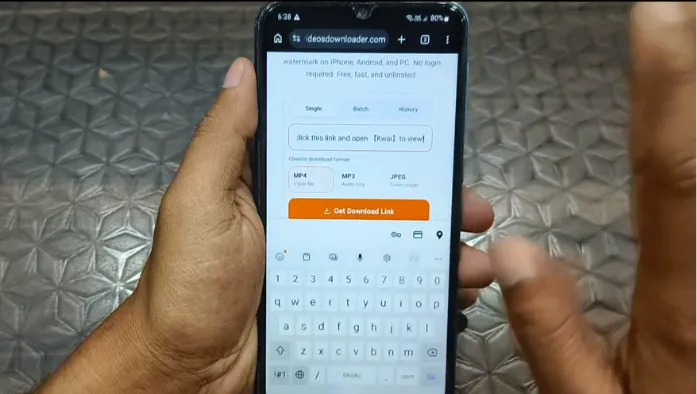
Downloading a public Kuaishou video takes three basic steps. You do not need to record the screen or manually recreate the video file.
Step 1: Find and Copy the Kuaishou Video Link
Open the Kuaishou and locate the video you want to save. Click on the sharing option and copy the video’s URL or share link.
Step 2: Paste the Link into the Downloader
Open the video downloader in your browser and paste the copied video link into the input field. Check the URL before starting the download.
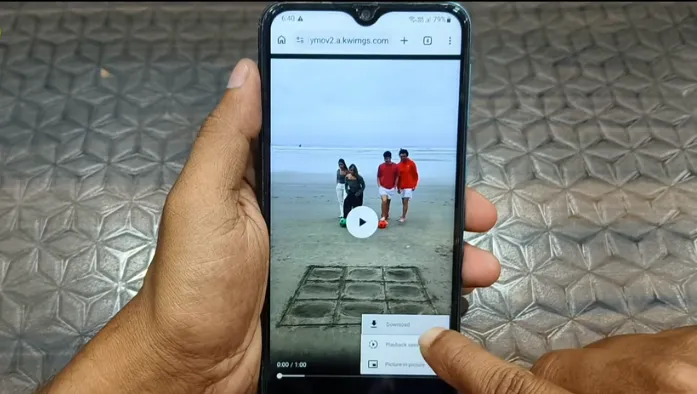
Step 3: Choose Quality and Download Your Video
After the link has been processed, available download options may appear. Select the quality or format that suits your needs and start the download.
Download Kuaishou Videos Without Watermark
A watermark can be removed depending on how the original content is delivered and what versions of the media are available. A downloader should not claim to remove every watermark from every video when the source itself does not provide a clean version.
Save Clean Videos Without the Kuaishou Logo
When a clean media source is available, the downloaded file may not contain the same visible Kuaishou branding found on an in-app video or screen recording.
Download Videos in HD and 4K Quality
Video quality depends on the original upload and the versions made available. If the source provides a lower-resolution, a downloader cannot turn it into 4K.
Save Kuaishou Videos as MP4
MP4 is a widely supported video format and works with most phones, computers, media players, and editing applications.
Extract Audio from Kuaishou Videos
Some downloading tools may offer audio extraction when the underlying media makes it possible. An audio option can be useful when you only need the sound rather than the complete video.
Supported Kuaishou and Kwai Link Formats
A good downloader should be designed to recognize commonly shared URLs rather than requiring users to find a special technical link.
Kuaishou App Share Links
Links copied directly from the Kuaishou app are the most natural starting point. Copy the URL using the platform’s share function and paste it into the downloader.
Kwai Video Links
Kwai links may also be encountered when accessing the international version of Kuaishou’s short-video ecosystem. Support depends on the downloader’s current URL handling.
Direct Video URLs
A direct media URL is different from an ordinary share link. For most users, copying the standard share URL is easier and safer than trying to locate technical media URLs manually.
Why Use Our Kuaishou Video Downloader?
Our downloader can be useful when you want a straightforward way to save publicly accessible content without installing another application.
Fast Online Video Processing
Browser-based processing avoids the need to install a dedicated desktop downloader. Processing speed can still vary because it depends on the video, and network.
Free and Unlimited Downloads
A free downloader can be convenient for occasional video saving. However, users should not assume that every service provides genuinely unlimited downloads.
No App or Software Installation
An online tool can be accessed directly from a browser. This is useful when you only need to save a video occasionally and do not want another application taking up storage.
No Registration Required
A downloader that does not require an account can reduce unnecessary steps. You can simply open the page, enter the link, and process the video when the service supports it.
Works Directly in Your Browser
The browser-based approach means you can use the tool without depending on a particular operating system or dedicated downloader application.
Privacy-Focused and Secure
Avoid entering sensitive information into a video downloader. A legitimate downloader should not need your Kuaishou password, private messages, or account credentials.
Simple One-Click Download Process
The main advantage is simplicity. Instead of recording your screen, copying files between devices, or installing extra software, you can work from the original video URL and download an available media file.
Download Kuaishou Videos on Any Device
The browser-based approach can make Kuaishou videos downloading on PC, Mac and other devices.
Kuaishou Downloader for Android
On Android, copy the video link from the Kuaishou or Kwai app and open the downloader in your preferred mobile browser. Paste the URL and save the resulting file when a supported download option appears.
Kuaishou Downloader for iPhone and iPad
iPhone and iPad users can follow the same general process through a supported browser. After downloading, the file may appear in the browser’s downloads location or the Files app, depending on the browser and device settings.
Kuaishou Downloader for Windows and Mac
On Windows or Mac, copy the video URL, open the downloader in a browser, and paste the link. Desktop computers can be especially convenient when managing larger video files or moving them into an editing workflow.
Mobile and Desktop Browser Support
The exact browser compatibility can vary, but modern browsers generally provide the basic functions required for copying links, processing pages, and downloading files.
Kuaishou vs. Kwai: What’s the Difference?
Kuaishou and Kwai are closely connected rather than being completely unrelated video platforms.
Kuaishou and Kwai Explained
Kuaishou is the platform’s widely used name, particularly in China, while Kwai is the brand name commonly associated with its international presence.
Can You Download Videos from Both Platforms?
Potentially, yes. If the downloader supports the specific URL format and the video is publicly accessible, the same basic copy-and-paste process may work.
Kuaishou Video Downloader Troubleshooting
Download problems can happen because of an invalid URL, unavailable content, browser issues, or platform changes. If your Kuaishou Video Downloader is not working, our troubleshooting can help you to find the cause.
Why Is My Kuaishou Video Not Downloading?
First, copy the video link again directly from the Kuaishou or Kwai sharing menu. Then paste the new link into the downloader.
If it still fails, the video may be private, unavailable, removed, region-restricted, or using a link format that the downloader currently does not recognize.
What to Do When a Kuaishou Link Is Not Supported
Try the original share URL instead of a modified link. Avoid adding extra characters or parameters to the URL.
Check the Video Link and Try Again
A simple link check can solve many problems. Make sure the copied URL belongs to the intended video and was not truncated when copied.
Why Download Quality May Vary
Available quality comes from the source media. If a creator uploaded a video in a particular resolution, the downloader cannot guarantee a higher native resolution simply by labeling the file as HD or 4K.
Conclusion
A Kuaishou Video Downloader provides a way to save supported Kuaishou and Kwai videos from a browser. The usual workflow is simple: copy the public video link, paste it into the downloader, select an available option, and save the file.
For the best experience, use the original share URL, choose a practical video quality, and remember that download availability depends on the source. Most importantly, respect creators’ rights and use downloaded content responsibly.